目标
- 掌握组件的通信方式
- 掌握 vuex 的使用
1、组件通信
通信的本质就是数据共享,组件间能够进行数据交互:
- 父子组件通信
- 多层级父子组件通信
- 非关系组件通信
父子组件间的通信
(1)
props/$emit(推荐)props: parent -> child$emit: child -> parant- 解耦度高
  // Home.vue
  <template>
    <div class="home">
      <h1>home page</h1>
      <div>get emit data from child: <span v-show="childData">{{childData}}</span></div>
      <br>
      <HomeChild title="home" @getChildData="getChildData"></HomeChild>
    </div>
  </template>

  <script>
  // @ is an alias to /src
  import HomeChild from '@/components/HomeChild.vue'

  export default {
    name: 'Home',
    components: {
      HomeChild
    },
    data() {
      return {
        childData: ''
      }
    },
    methods: {
      getChildData(txt) {
        this.childData = txt
        console.log(txt);
      }
    },
  }
  </script>
// HomeChild.vue <template> <div> <h2>child-component</h2> props data : <strong>{{title}}</strong> <div @click="handleClick"><button>$emit</button></div> </div> </template> <script> export default { props: ['title'], methods: { handleClick() { let rendomDatas = [ 'my data is getting from child', 'data get from home child', 'my name is homechild' ] this.$emit('getChildData', rendomDatas[Math.floor(Math.random()*rendomDatas.length)]) } }, } </script>(2)
$refs/refref:给元素或子组件注册引用信息$refs:获取通过 ref 注册的引用- 不同情况获取到的引用信息不一样:
- 挂载到自定义组件:获取当前VueComponent的实例;
- 挂载到普通元素,获取原生元素的实例
// About.vue
<template>
  <div class="about">
    <h1>This is an about page</h1>
    <button @click="sayHi">say hi to aboutChild</button> <span>:{{txt}}</span>
    <AboutChild ref="aboutChild"></AboutChild>
  </div>
</template>

<script>
import AboutChild from '@/components/AboutChild.vue'
export default {
  components: {
    AboutChild,
  },
  data() {
    return {
      txt: ''
    }
  },
  methods: {
    sayHi() {
      const { aboutChild } = this.$refs
      console.log(aboutChild);
      aboutChild.sayHello()
      this.txt = aboutChild.txt
    }
  },
}
</script>
// AboutChild.vue <template> <div> <h2>About-child</h2> <div>。。。</div> <button @click="handleChange">change</button> </div> </template> <script> export default { data() { return { txt: 'hello about' } }, methods: { sayHello() { console.log(this.txt); }, handleChange() { this.txt = 'hi about' console.log(this); } }, } </script>(3)
$parent/$children(组件复杂多变情况下不推荐)$parent:获取当前组件的父组件实例$children:获取当前组件的所有子组件实例- 强依赖,脆弱,容错性差。
// Parent.vue
<template>
  <div>
    <h1>This is a Parent Page</h1>
    <button @click="handleClick">get Child</button><span>{{txt}}</span>
    <ParentChild></ParentChild>
  </div>
</template>
<script>
import ParentChild from '@/components/ParentChild.vue'
export default {
  components: {
    ParentChild,
  },
  data() {
    return {
      txt: ''
    }
  },
  methods: {
    handleClick() {
      this.txt = this.$children[0].txt
    },
    changeTxt() {
      this.txt = 'change from child'
    }
  },
}
</script>
// ParentChild.vue <template> <div> <h2>parent--child</h2> <button @click="handleChange">change</button> </div> </template> <script> export default { data() { return { txt: 'hello parent' } }, methods: { handleChange() { this.$parent.changeTxt() } }, } </script>
多层级父子组件间的通信
(1)provide/inject:依赖注入
依赖注入是单向数据流,只能父组件给子孙组件传递数据,
provide/inject这对选项需要一起使用,以允许一个祖先组件向其所有子孙后代注入一个依赖,不论组件层次有多深,并在其上下游关系成立的时间里始终生效
provide提供- 父组件提供给子孙组件要使用的数据
- 形式: 对象、函数
// 写法一:this指向provide
provide: {
  compATitle: 'a----',
  compA: this
}
// 写法二:this指向调用的对象
provide ()  {
  return {
    compATitle: 'a----',
    compA: this
  }
}
inject注入- 父组件通过
provide提供数据,所有子组件都可以通过inject获取值 - 形式:字符串数组、对象(from、default)
inject: ['compATitle', 'compA']- 父组件通过
(2)$attrs/$listeners
$attrs:通信的本质$attrs包含了父作用域中不作为 props 被识别获取的属性 (class和style除外)绑定当一个组件没有声明任何 props 时,
$attrs会包含所有父作用域的绑定 (class和style除外),并且可以通过v-bind="$attrs"传入内部组件inheritAttrs- 内部组件使用,用于组件属性的显示与否
- 只对当前组件有效
- 默认为
true,$attrs容器中的属性显示在标签中 - 为
false时,内部组件上$attrs容器中的属性不显示
<template> <div> <h2>CompA</h2> <comp-b title="this is a message from comA"></comp-b> </div> </template><template> <div> <h2>CompB</h2> <!-- props外,父组件传过来的属性 --> <comp-c v-bind="$attrs"></comp-c> </div> </template> <script> import CompC from './CompC' export default { components: { CompC, }, inheritAttrs: false, // 不显示props外,父组件传过来的属性 created() { console.log(this.$attrs) // {title: "this is a message from comA"} }, } </script>$listeners- 包含了父作用域中的 (不含 .native 修饰器的)
v-on事件监听器 - 它可以通过
v-on="$listeners"传入内部组件 - 一般运用与组件库的逻辑,普通的业务逻辑不需要用到
<template> <div> <h2>CompA</h2> <comp-b title="this is a message from comA" @a="handleA" @b="handleB" @click="handleClick"></comp-b> </div> </template><template> <div> <h2>CompB</h2> <comp-c v-on="$listeners"></comp-c> <button @click="getListeners">getListeners</button> </div> </template><template> <div> <h2>CompC</h2> <div>{{compATitle}}</div> <comp-d></comp-d> </div> </template> <script> import CompD from './CompD' export default { inject: ['compATitle'], inheritAttrs: false, components: { CompD, }, created() { console.log(666, this.$listeners); }, } </script>- 包含了父作用域中的 (不含 .native 修饰器的)
非关系组件通信
Vuex:状态管理机制EventBus:Vue的实例对象- $on
- $off
- $emit
- $once
import Vue from "vue"; // off emit once on // vue3 export const eventBus = new Vue();<script> import { eventBus } from "../eventBus"; export default { mounted() { eventBus.$on("forComC", this.handleForComC); }, methods: { handleForComC() { console.log("handleForComC"); }, } } </script><template> <div> CompC <button @click="handlebyEventBug">byEventBug</button> </div> </template> <script> import { eventBus } from "../eventBus"; export default { methods: { handlebyEventBug() { eventBus.$emit("forComC"); } }, }; </script>
2、vuex
- state,驱动应用的数据源;
- view,以声明方式将 state 映射到视图;
- actions,响应在 view 上的用户输入导致的状态变化。
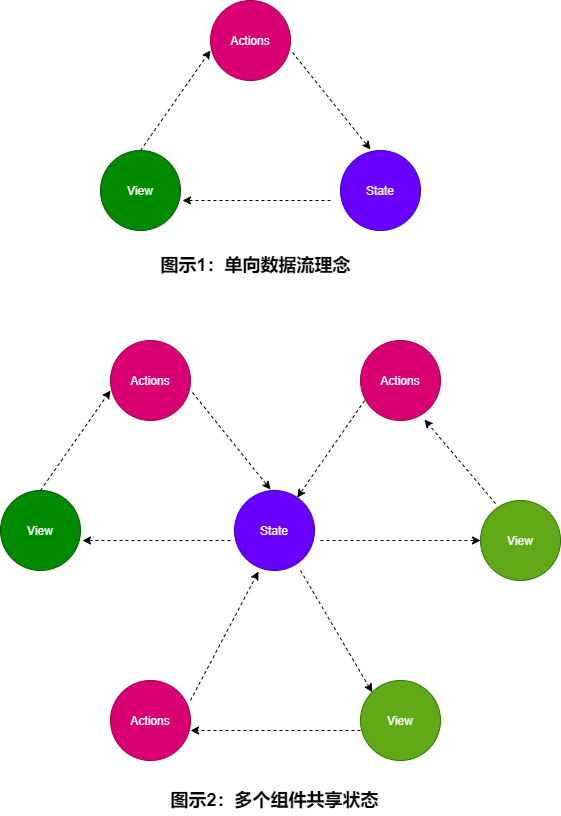
应用遇到多个组件共享状态时,单向数据流的简洁性很容易被破坏:
- 多个视图依赖于同一状态。
- 来自不同视图的行为需要变更同一状态。
概念
what(是什么)?
Vuex 是一个专为 Vue.js 应用程序开发的状态管理模式why(解决什么问题)?
- 多个视图依赖于同一状态
- 来自不同视图的行为需要变更同一状态
How(怎么做)?
把组件的共享状态抽取出来,以一个全局单例模式管理好处?
我们的组件树构成了一个巨大的“视图”,不管在树的哪个位置,任何组件都能获取状态或者触发行为!通过定义和隔离状态管理中的各种概念,并通过强制规则维持视图和状态间的独立性,我们的代码将会变得更结构化且易维护。
什么时候用?
Flux 架构就像眼镜:您自会知道什么时候需要它。
安装
npm install vuex --save
3、全局状态 state
state为Vue实例的全局单例管理状态,在 vue 组件中通过计算属性获取state值,为简化组件的重复和冗余的计算属性,mapState辅助函数简化了组件生成计算属性的操作。
// store/index.js
import Vue from 'vue'
import Vuex from 'vuex'

Vue.use(Vuex) // 注册vuex

console.log(Vuex); // 一个对象 Store是一个类/构造函数

const strore = new Vuex.Store({
  state: {
    user: {
      age: 18,
      name: 'xiaohei'
    }
  }
})

export default strore
// main.js
import Vue from 'vue'
import App from './App.vue'
import store from './store'

Vue.config.productionTip = false

new Vue({
  // 挂载到Vue实例中,通过this.$store访问
  store,
  render: h => h(App)
}).$mount('#app')
// Foo.vue
<template>
  <div>
    <h2>Foo</h2>
    <div>名字:{{user.name}} 年龄:{{user.age}}</div>
  </div>
</template>
<script>
export default {
  data() {
    return {
      // user: this.$store.state.user
    }
  },
  mounted() {
    console.log(this.$store.state);
  },
  computed: {
    // state属于全局计算属性,在Bar组件改变它时,Foo组件可以共享改变后的值
    user() {
      return this.$store.state.user
    }
  },
}
</script>
//Bar.vue
<template>
  <div>
    <h2>Bar</h2>
    <div>姓名:{{user.name}} 年龄: {{user.age}}</div>
    <button @click="handleChange">change</button>
  </div>
</template>
<script>
export default {
  data() {
    return {
      user: this.$store.state.user
    }
  },
  methods: {
    handleChange() {
      this.$store.state.user.age = 30
    }
  },
}
</script>
<style lang="">

</style>
mapState辅助函数
动机
当一个组件需要获取多个状态的时候,将这些状态都声明为计算属性会有些重复和冗余。形式
对象、数组与局部计算属性混合使用
展开运算符<template> <div> <h2>Foo</h2> <div>名字:{{user.name}} 年龄:{{user.age}}</div> <button @click="handleChange">change</button> </div> </template> <script> import { mapState } from 'vuex' export default { mounted() { console.log(this.$store.state); }, computed: { // 对象展开运算符 ...mapState(['user','token']), // user() { // return this.$store.state.user // }, // token() { // return this.$store.state.user.token // } }, methods: { handleChange() { this.$store.state.user.name = 'xiaohong' } }, } </script>
4、全局计算属性 getters
概述
getters属于Store的计算属性,getter 的返回值会根据它的依赖被缓存起来,且只有当它的依赖值发生了改变才会被重新计算。Getter 接受 state 作为其第一个参数:
const strore = new Vuex.Store({
  state: {
    user: {
      age: 18,
      name: 'xiaohei'
    },
    totken: ''
  },
  // 全局的计算属性,依赖state属性
  getters: {
    tenYearsOld(state) {
      return state.user.age + 10
    }
  }
})
动机
需要从 store 中的 state 中派生出一些状态,例如对列表进行过滤并计数如果有多个组件需要用到此属性,我们要么复制这个函数,或者抽取到一个共享函数然后在多处导入它——无论哪种方式都不是很理想
和计算属性一样,会缓存
访问全局属性getters方式:
(1)通过属性访问
this.$store.getters.xxx(2)通过方法访问
返回一个函数,来实现给getter传参: 不同组件传入不同参数,获得不同的值(3)mapGetters辅助函数
将store中的getter映射到局部计算属性:...mapGetters(['tenYearsOld'])
5、状态提交方法 mutations
概述
mutations 是提交store中状态的唯一方法,每个mutation都有一个字符串的 事件类型 (type) 和 一个 回调函数 (handler):
- state 作为第一个参数
- 回调函数就是我们实际进行状态更改的地方
- 必须是同步的, 方便追踪状态的改变
- 实质上任何在回调函数中进行的状态的改变都是不可追踪的
使用
调用
store.commit提交负荷payload(传入的传参)
mapMutation辅助函数:将组件中的 methods 映射为 store.commit 调用
对象风格的提交方式
const strore = new Vuex.Store({
  // 全局状态
  state: {
    user: {
      age: 18,
      name: 'xiaohei'
    },
    totken: ''
  },
  // 全局的计算属性,依赖state属性
  getters: {
    tenYearsOld(state) {
      return state.user.age + 10
    }
  },
  // 提交状态:类似自定义的事件类型
  mutations: {
    // payload是载荷:传入的额外参数
    changeName(state, payload) {
      state.user.name = payload
    },
    changeAge(state, payload) {
      state.user.age = payload.age
      // 同时多个组件触发时会有问题
      // setTimeout(() => {
      //   state.user.age = payload.age
      // }, 1000);
    },

  }
})
// 1、store.commit()传入参数 export default { methods: { handleChangeName(){ // 第二个参数为载荷payload console.log(this.$store); this.$store.commit('changeName', 'zy') }, handleChangeAge() { // 整个对象都作为载荷payload传给 mutation 函数 this.$store.commit({ type: 'changeAge', age: 22 }) } } }<template> <div> <button @click="changeAge({age: 80})">changeAge</button> </div> </template> <script> // mapMutations export default { methods: { ...mapMutations([ 'changeAge' ]), }, } </script>
6、触发状态提交 actions
Actions 类似于 mutations,不同在于:
- Action 提交的是 mutation,而不是直接变更状态。
- Action 可以包含任意异步操作。
- 异步操作解决方案。
使用
- store.dispatch
- mapActions: 与mapMutations一样用法
- 组合 Action: 可返回 promise
<template>
  <div>
    <button @click="handleFetchData">Fetch Data</button>
    <button @click="changeName('zy')">handleChangeName</button>
  </div>
</template>
<script>
import { mapActions } from 'vuex'
export default {
  methods: {
    ...mapActions([
      'changeName'
    ]),
    handleFetchData() {
      this.$store.dispatch('changeName', 'zy')
    }
  },
}
</script>